

Using H Tags for On-Page Optimization and UI Improvements
What Are H Tags?
H tags, or header tags, are HTML elements used to define headings on a webpage. They range from <h1> to <h6>, with <h1> being the most important and <h6> the least. These tags help structure your content, making it easier for both users and search engines to understand. On your web page in code view or a code editor an H tag would be implimented like this <h2>Our Dervices</h2>
Why Are H Tags Important?
- SEO Benefits: Search engines use H tags to determine the hierarchy and importance of content on a page. Proper use of H tags can improve your search engine rankings.
- User Experience: Well-structured content is easier to read and navigate. H tags break up text, making it more digestible for users.
How to Use H Tags Effectively
- Start with
<h1>: Your main heading should be an<h1>tag. This is usually the title of your page or article. - Use
<h2>for Subheadings: Break down your content into sections with<h2>tags. These should be the main points or topics. - Go Deeper with
<h3>to<h6>: If you need to break down sections further, use<h3>to<h6>tags. This creates a clear hierarchy.
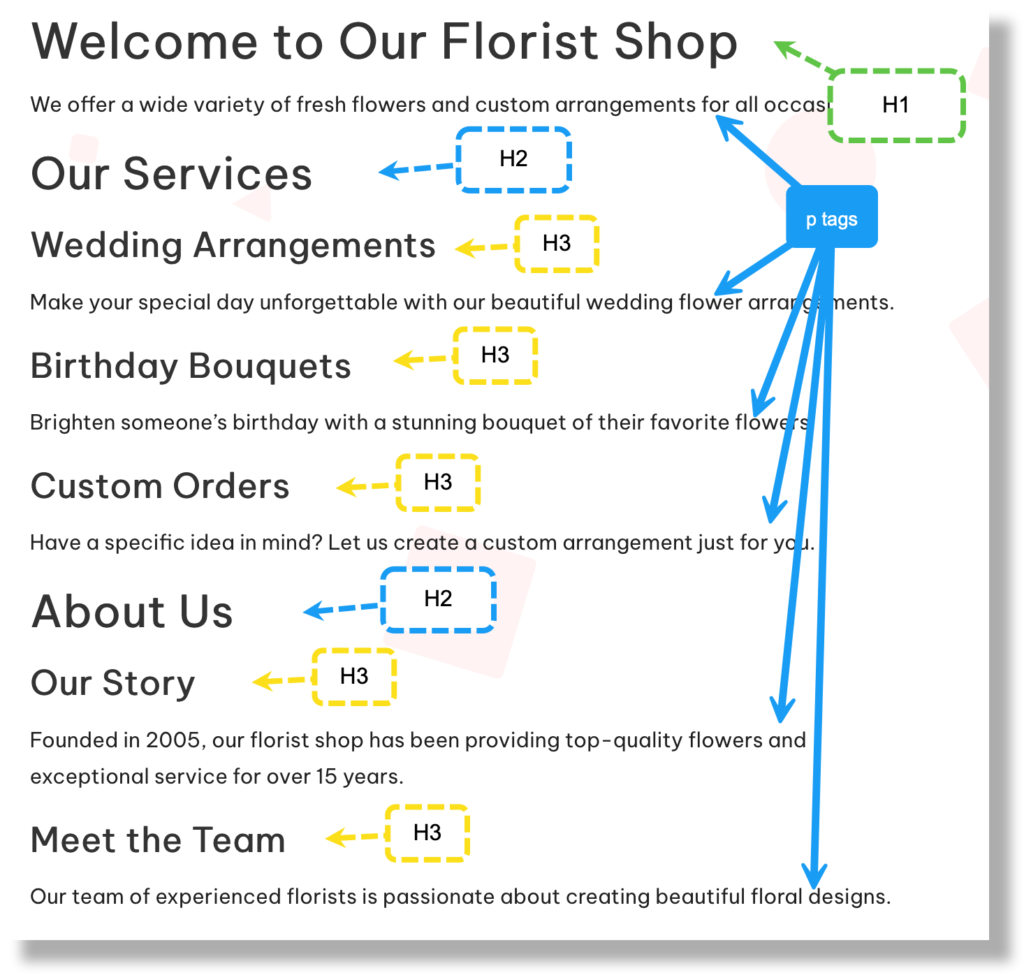
This is how H tags may be used on the web page of a florist.
<body>
    <h1>Welcome to Our Florist Shop</h1>
    <p>We offer a wide variety of fresh flowers and custom arrangements for all occasions.</p>
    <h2>Our Services</h2>
    <h3>Wedding Arrangements</h3>
    <p>Make your special day unforgettable with our beautiful wedding flower arrangements.</p>
    <h3>Birthday Bouquets</h3>
    <p>Brighten someone's birthday with a stunning bouquet of their favorite flowers.</p>
    <h3>Custom Orders</h3>
    <p>Have a specific idea in mind? Let us create a custom arrangement just for you.</p>
    <h2>About Us</h2>
    <h3>Our Story</h3>
    <p>Founded in 2005, our florist shop has been providing top-quality flowers and exceptional service for over 15 years.</p>
    <h3>Meet the Team</h3>
    <p>Our team of experienced florists is passionate about creating beautiful floral designs.</p>
    <h2>Contact Us</h2>
    <h3>Location</h3>
    <p>123 Flower Lane, Blossom City, FL 12345</p>
    <h3>Hours</h3>
    <p>Monday - Friday: 9am - 6pm<br>Saturday: 10am - 4pm<br>Sunday: Closed</p>
    <h3>Get in Touch</h3>
    <p>Phone: (123) 456-7890<br>Email: contact@floristshop.com</p>
</body>
This would be the output of the code.
Best Practices
- One
<h1>Per Page: Stick to one<h1>tag per page to avoid confusing search engines. - Keyword Optimization: Include relevant keywords in your headings to improve SEO.
- Consistency: Use H tags consistently throughout your site to maintain a uniform structure.
Improving UI with H Tags
- Visual Hierarchy: H tags create a visual hierarchy, making it easier for users to scan and find information.
- Accessibility: Screen readers use H tags to navigate content, improving accessibility for visually impaired users.
- Styling: Use CSS to style H tags, making them stand out and match your brand’s look and feel.
Interesting!
While HTML and CSS standards typically render h1 tags with a larger font size than h2 tags, you can customize the font sizes using CSS to fit your design needs. Although h1 tags are usually the largest and h6 tags the smallest, this hierarchy is not mandatory. You have the flexibility to style these elements as you see fit.
Conclusion
Using H tags effectively can significantly improve both your website’s SEO and user experience. By structuring your content with these tags, you make it easier for search engines to index your site and for users to navigate it. Implement these tips to enhance your small business website and see better performance and rankings.

