

What is Image Tagging?
Image tagging involves adding descriptive labels or keywords to images. This helps search engines understand the content of the images, making them more accessible and searchable.

Example code block of this image.
<img fetchpriority="high" decoding="async" width="600" height="400" src="https://guide.e-bd.co.uk/wp-content/uploads/2024/09/photography-image.jpg" alt="Image of photographer looking at a camera in front of an imac computer" class="wp-image-50" srcset="https://guide.e-bd.co.uk/wp-content/uploads/2024/09/photography-image.jpg 600w, https://guide.e-bd.co.uk/wp-content/uploads/2024/09/photography-image-300x200.jpg 300w" sizes="(max-width: 600px) 100vw, 600px">Why is Image Tagging Important for SEO?
- Improves Search Rankings: Properly tagged images can improve your website’s search engine rankings. Search engines like Google use image tags to index and rank images in search results.
- Enhances User Experience: Descriptive tags help users find relevant images quickly, improving their overall experience on your site.
- Increases Traffic: Well-tagged images can appear in image search results, driving more traffic to your website.
Key Elements of Image Tagging
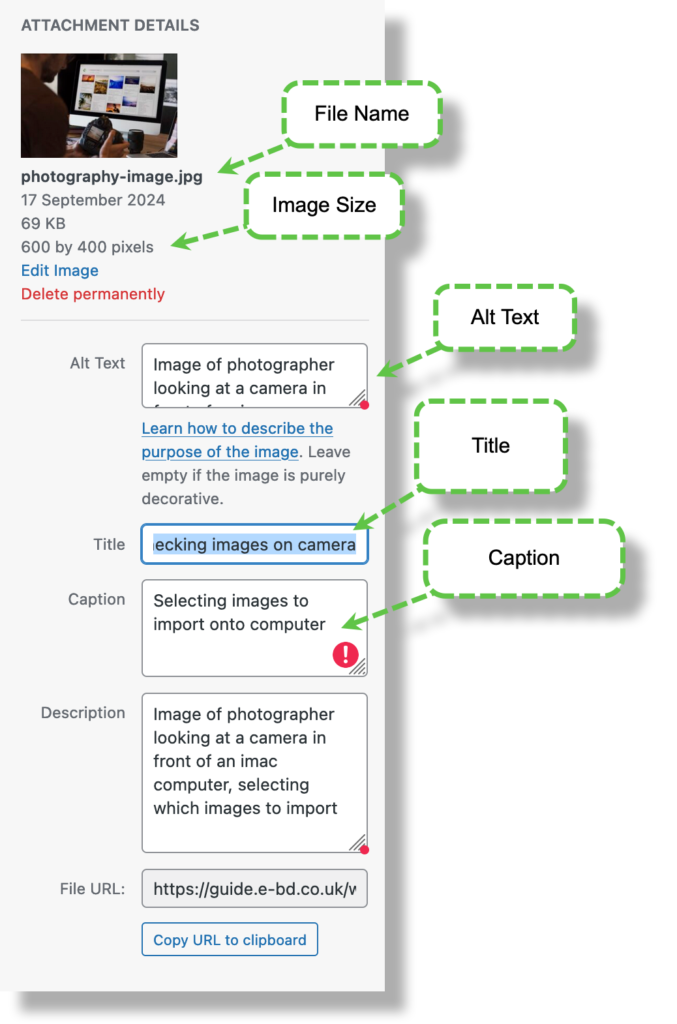
- Alt Text: This is a brief description of the image. It helps search engines understand the image content and improves accessibility for visually impaired users.
- Title Tags: These provide additional context and can enhance the user experience when they hover over an image.
- File Names: Use descriptive file names instead of generic ones like “IMG1234.jpg”. For example, “blue-sneakers.jpg” is more informative.
- Captions: Adding captions can provide context and improve user engagement.
Best Practices for Image Tagging
- Be Descriptive but Concise: Use clear and concise language to describe the image. Avoid keyword stuffing.
- Use Relevant Keywords: Incorporate relevant keywords naturally into your tags to improve SEO.
- Optimize Image Size: Ensure your images are optimized for fast loading times without compromising quality.
- Use High-Quality Images: High-quality images are more likely to be shared and linked to, which can boost your SEO.
Conclusion
Image tagging is a crucial aspect of SEO that can significantly impact your website’s visibility and user experience. By following best practices and using the right tools, you can ensure your images contribute positively to your overall SEO strategy.